We have compiled a list of manufacturers, distributors, product information, reference prices, and rankings for Action PC.
ipros is IPROS GMS IPROS One of the largest technical database sites in Japan that collects information on.

Action PC(3D CAD) - List of Manufacturers, Suppliers, Companies and Products

Action PC Product List

1~7 item / All 7 items

Displayed results

Applied AutoDesk Fusion Designer CAE PC

Consolidating everything needed for 3D manufacturing into one.

An all-in-one package that can handle everything from design to analysis and manufacturing, with software capable of 3D CAD/CAM/CAE simulations. AutoDesk Fusion is software that consolidates all the necessary functions for manufacturing into one package. It includes features for 3D modeling, assembly, 2D drawing creation, analysis functions, and cutting tool path creation (CAM), as well as advanced capabilities for high-quality product design, such as circuit design and generative design tools that utilize AI. Additionally, by leveraging cloud technology, it enables reduced analysis computation time and data sharing that is not limited by location.

  • Fusion WS000003.JPG
  • Fusion WS000004.JPG
  • Fusion WS000005.JPG
  • Structural Analysis
  • Thermo-fluid analysis
  • Stress Analysis

Added to bookmarks

Bookmarks list

Bookmark has been removed

Bookmarks list

You can't add any more bookmarks

By registering as a member, you can increase the number of bookmarks you can save and organize them with labels.

Free membership registration

Applied AutoDesk Inventor Designer CAE PC

Powerful integrated solution of CAD and simulation.

Inventor Nastran is an embedded finite element analysis (FEA) software integrated into "Inventor" for designers and analysts. It is used for professional-level simulation analysis and virtual prototypes of models designed in CAD. Since it is integrated into Inventor, it allows for analysis while designing, thereby speeding up and improving the efficiency of the design process. With Autodesk Inventor Nastran, you can perform professional-level simulation analysis. Inventor Nastran supports everything from basic FEA to more advanced FEA, and offers various features such as: - Material model analysis - Automatic drop testing - Automatic impact analysis - Automatic generation of neutral plane meshes - Optimization of beam modeling, among others.

  • InventorNastran WS000003.JPG
  • InventorNastran WS000004.JPG
  • InventorNastran WS000005.JPG
  • Structural Analysis
  • Stress Analysis
  • Thermo-fluid analysis

Added to bookmarks

Bookmarks list

Bookmark has been removed

Bookmarks list

You can't add any more bookmarks

By registering as a member, you can increase the number of bookmarks you can save and organize them with labels.

Free membership registration

3D Measurement and Inspection Software PolyWorks Compatible PC

Workstation compatible with "PolyWorks Inspector" for comparing 3D point clouds and CAD and performing error analysis.

Industry-standard software that analyzes 3D measurement data and guarantees adherence to design specifications. PolyWorks | Inspector is a three-dimensional inspection and quality control software that can accurately analyze vast amounts of point cloud data obtained from CMMs (Coordinate Measuring Machines), laser scanners, optical scanners, and more, by matching it with CAD models. It is adopted across a wide range of manufacturing sectors, including automotive, aerospace, and precision machinery, contributing to quality assurance and improved production efficiency. ■ Key Features - Point cloud processing capabilities: noise removal, mesh generation, surface reconstruction - CAD matching/verification: error color map display, GD&T (Geometric Dimensioning and Tolerancing) analysis - Automation support: automation of inspection sequences, automatic report generation - Data integration: compatible with SPC (Statistical Process Control) and PLM systems ■ Benefits of Implementation - Quantifies the differences between design and actual products, ensuring product quality - Streamlines inspection processes and eliminates reliance on individual expertise - Builds a digital quality foundation compatible with smart factories To comfortably process vast point clouds and CAD models, a combination with a high-end workstation equipped with a high-performance CPU, professional GPU, and large-capacity memory is optimal.

  • PolyWorks2.png
  • 3D CAD
  • Rendering software
  • Desktop PC

Added to bookmarks

Bookmarks list

Bookmark has been removed

Bookmarks list

You can't add any more bookmarks

By registering as a member, you can increase the number of bookmarks you can save and organize them with labels.

Free membership registration

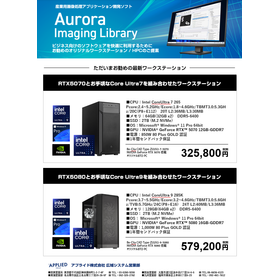
Aurora Imaging Library Compatible PC

Industrial image processing application "Aurora Imaging Library" compatible PC

The Aurora Imaging Library is an "industrial image processing library with excellent embedded capabilities and stability," characterized by its suitability for system development focused on device integration and control. - Developer: Matrox Imaging, Canada - Overview: A comprehensive software library developed for industrial image processing and machine vision - Availability: Usable through APIs such as C/C++, C#, .NET. GUI-based development is also possible in conjunction with Aurora Design Assistant - Main Features: - Image acquisition and preprocessing (filtering, geometric transformations, etc.) - Pattern matching, dimension measurement, character recognition (OCR) - Color-based inspection, appearance inspection - 3D image processing (stereo, laser, point cloud analysis) - Classification and detection using deep learning (supports NVIDIA GPU) - Characteristics: - Modular, allowing only the necessary functions to be integrated - In SDK format, enabling flexible integration into embedded devices and dedicated equipment - Widely used by inspection equipment manufacturers and for research purposes, with strengths in real-time performance and stability.

  • Aurora Imaging Library 1.png
  • Image Processing Software
  • Industrial PCs

Added to bookmarks

Bookmarks list

Bookmark has been removed

Bookmarks list

You can't add any more bookmarks

By registering as a member, you can increase the number of bookmarks you can save and organize them with labels.

Free membership registration

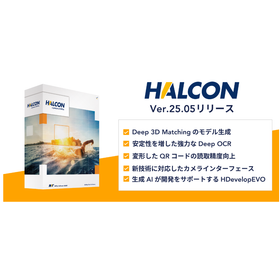
"HALCON 25.05" compatible workstation

HALCON Progress 25.05 - Fusion of AI and Rule-Based Image Processing - Compatible PC

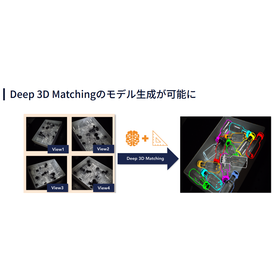
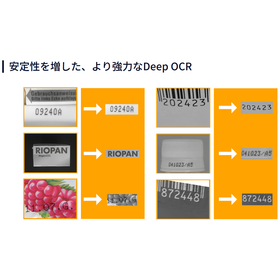
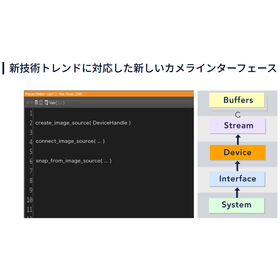
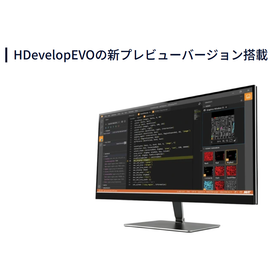
HALCON Progress Edition 25.05 is the latest version released on May 27, 2025, and is an evolving software that provides the latest image processing technology every six months. ■Main New Features and Improvements - Enhanced AI has improved 3D recognition, OCR accuracy, and development efficiency. - Non-contact position estimation using CAD-based Deep 3D Matching. - Deep OCR alignment function that withstands inaccurate ROIs. - Code correction function that can achieve high precision for curved QR codes. - An interface that balances compatibility with the latest cameras and ease of use. - Modular development and AI-assisted development support through HDevelopEVO. - Flexible learning control effective in embedded environments.

  • HALCON.2.png
  • HALCON.3.png
  • HALCON.4.png
  • HALCON.5.png
  • HALCON.6.png
  • HALCON.7.png
  • Image Processing Software
  • Industrial PCs

Added to bookmarks

Bookmarks list

Bookmark has been removed

Bookmarks list

You can't add any more bookmarks

By registering as a member, you can increase the number of bookmarks you can save and organize them with labels.

Free membership registration

Recommended PC for AFDEX by Applied

Forging Analysis Simulation System AFDEX Recommended Workstation

A forging analysis simulation that anyone can easily use. AFDEX supports process design by predicting the manufacturability of forged products. AFDEX is a forging simulation software that can predict issues related to forging, from cold forging to hot forging in various settings. It is applicable to forging analysis in all fields and has achieved results even in areas with few industry precedents, such as thread rolling and plate forging. The user interface is intuitive and easy to understand, allowing analyses to be executed with minimal settings, enabling users to immediately benefit from forging simulation upon implementation.

  • AFDEX_1.JPG
  • Structural Analysis
  • Mechanism Analysis
  • Stress Analysis

Added to bookmarks

Bookmarks list

Bookmark has been removed

Bookmarks list

You can't add any more bookmarks

By registering as a member, you can increase the number of bookmarks you can save and organize them with labels.

Free membership registration

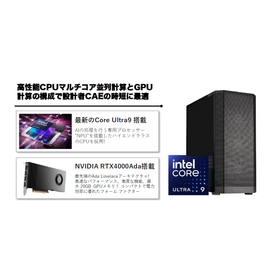
Applied Moldex3D Recommended PC

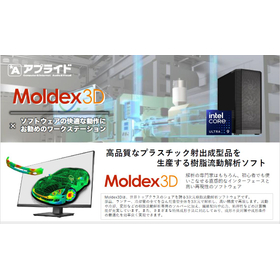
Moldex3D is software with an intuitive interface that can be mastered by both experts in analysis and beginners, offering high reproducibility.

Moldex3D is a three-dimensional resin flow analysis software that boasts a world-class market share. It analyzes the entire mold, including parts, runners, and cooling channels, in three dimensions and reproduces it with high accuracy. In addition to solvers specifically designed for resin flow analysis, such as flow, cooling, and deformation, it offers robust computational features for fiber orientation, stress, and viscoelasticity. It also supports various special molding techniques, enabling efficient solutions for molding defects and optimization of molding conditions. The developer, CoreTech System Co., Ltd., was founded in Taiwan in 1995. Since then, it has led the plastic injection molding industry and continues to provide excellent CAE solutions. Moldex3D is equipped with a variety of optional features in addition to basic analysis functions such as flow, packing pressure, cooling, and deformation (warpage) to meet all the resin flow analysis needs required in design settings. Notably, it features advanced 3D mesh technology-based analysis solvers for fiber orientation and viscoelasticity, an interface with FEA (Finite Element Analysis), analysis tools for molding processes such as hot runners, and modules that support special molding techniques like compression molding and FIM (Fine Bubble Resin Injection Molding).

  • WS000003.JPG
  • Structural Analysis
  • Thermo-fluid analysis
  • Mechanism Analysis

Added to bookmarks

Bookmarks list

Bookmark has been removed

Bookmarks list

You can't add any more bookmarks

By registering as a member, you can increase the number of bookmarks you can save and organize them with labels.

Free membership registration